

Getting started
First launch of SuperCharged against one or more catalogue sources (NetBox, phpIPAM, or KeePass).
Install SuperCharged
Download Windows x64 MSI or use the authenticated Debian 13 x64 APT instructions on the Download page. macOS builds are available on request. Free personal licenses receive Canary builds while the free-access offer remains available. They cover personal use only, including private home labs; business, professional and organizational use, including evaluation or testing, requires separate express written commercial authorization from Aurora. See the license conditions or contact Aurora.
Prerequisites
- At least one catalogue you can reach this session
- NetBox / phpIPAM: a reachable http or https URL. For phpIPAM, an administrator must create an API app named
supercharged(Admin → API). - KeePass: a local
.kdbxfile (optional key file) and the master password. You can Create a new empty database from Add source. - Network path from this machine to remote catalogues and to the devices you will SSH into
Select sources → authenticate → load inventory → select a device → connect.
Steps
| Step | Action | Result |
|---|---|---|
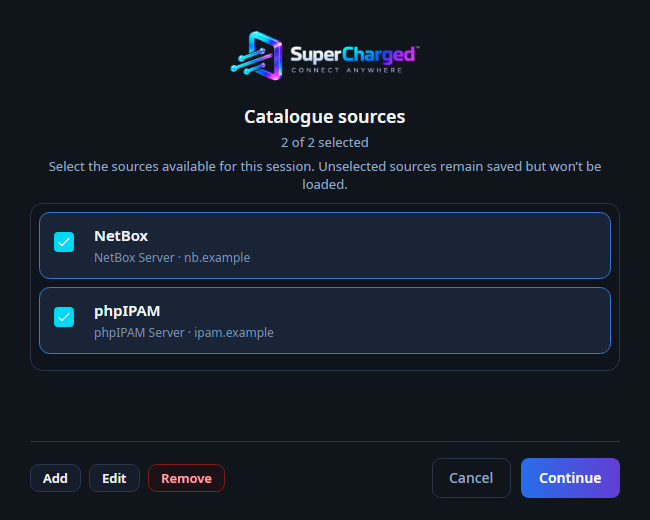
| 1 | Start SuperCharged | Bootstrap window shows saved catalogue sources |
| 2 | Add, edit, or remove a highlighted source; use Remove all only to delete every saved source. Select the sources available for this session | Source list changes save immediately. Continue remembers which sources were selected for the next launch. Unselected sources stay in settings and are not loaded |
| 3 | Continue, then enter credentials for each checked source | Sign-in shows the source name only (URL and kind are edited from the source list via Back or Add/Edit). Credentials stay in memory only |
| 4 | If a source is wrong or unreachable, choose Back | Returns to the source list so you can add, edit, remove, or uncheck it |
| 5 | Wait for catalogue load | Main window opens with one tree root per checked source |
| 6 | Double-click a device or use Connect to SSH | SSH session tab opens |
Username/password (or KeePass master password) stay in process memory for this run only. NetBox uses a rolling auto-provisioned API token. phpIPAM uses a session token from the API app. See Security for idle lock and the session audit log.
Back on sign-in returns to the source list (session credentials are cleared). Cancel exits the application. If catalogue load fails, the main window still opens so you can Refresh unlocked sources.
You can also manage sources later under Options and settings.